 ExhibitBench
Bates stamping that never loses count.
ExhibitBench batch-stamps productions, applies exhibit stickers and confidentiality legends, and keeps a per-matter numbering registry - so the next production starts exactly where the last one stopped. A native Mac app that works entirely offline.
Workflow
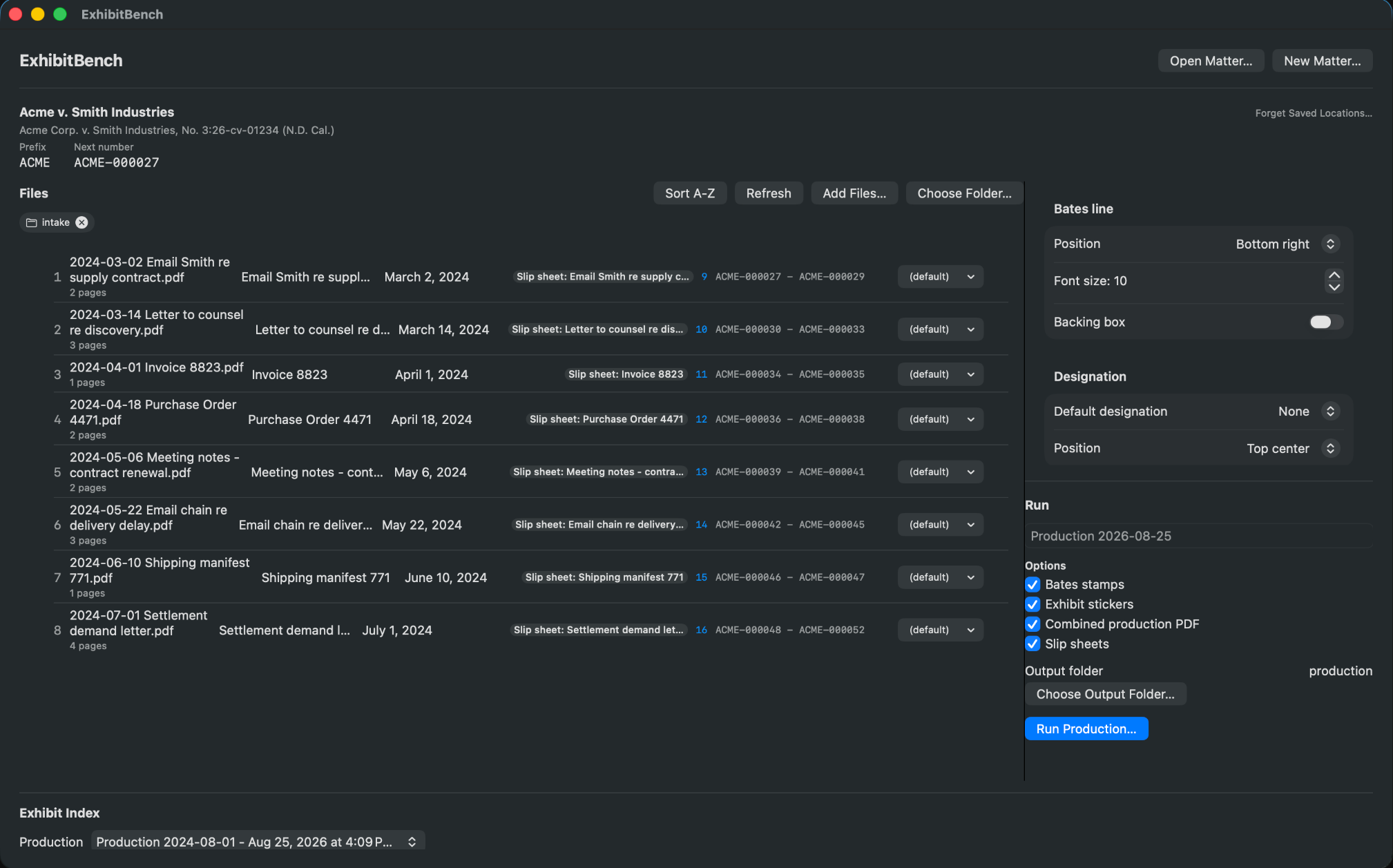
A production is three moves
No project setup ceremony, no import pipeline. The app mirrors how a production actually happens at a small firm.
Create a matter
Pick a Bates prefix, a starting number and digit width once. The matter file remembers everything between sessions.
Drop in the PDFs
Add a folder or individual files. Choose legends per document and sticker sequences per exhibit - never one blanket setting for the whole case.
Run the production
Stamped copies, slip sheets, a combined production PDF and an exhibit index - written to the folder you choose. Originals are never touched.
The part that saves you
The registry is the point
Overlapping Bates ranges between two batches of the same case are the classic production mistake - a mistyped starting number, and two documents share a number forever. ExhibitBench makes that structurally impossible.
- The registry advances only when a production runs. Numbers are never skipped and never reused.
- The next batch starts itself. No spreadsheet of "last used number", no asking a colleague.
- Every run is logged, append-only. The registry doubles as an audit trail you can show, not just describe.
- Deterministic output. The same production against the same registry state produces the same stamped files, every time.
Matter registry · ACME v. Initech
| Production 001 · Jun 12 | ACME-000001 – 000082 |
| Production 002 · Jul 03 | ACME-000083 – 000146 |
| Next number | ACME-000147 |
On the bench
Everything a production set needs
Batch Bates stamping
A whole folder in one pass. Configurable prefix, zero-padded width, separator and position presets, including standard bottom-right.
Confidentiality designations
CONFIDENTIAL, ATTORNEYS' EYES ONLY or custom text at the top of the page - a separate anchor from the Bates footer, applied per document.
Exhibit stickers
Classic and minimal styles on the first page. Numeric or alpha sequences for plaintiff, defendant or deposition-style numbering.
Slip sheets
Placeholder pages that carry their own Bates number, the same way a real production set treats them.
Exhibit index export
PDF, DOCX or CSV - ready to attach to a filing or hand to opposing counsel.
Production log
An append-only record of every run: what was stamped, with which range, when. Your audit trail writes itself.
Confidentiality
Confidential by absence, not by policy
Client documents are the one thing a firm cannot casually upload. ExhibitBench is a sandboxed, signed macOS app with no network capability at all - so the upload question simply never comes up.
- No upload. Stamping happens on your Mac, in the app's sandbox.
- No account. Nothing to sign into, nothing to reset.
- No analytics. The app phones home to no one - it has no way to.
- Simple to prove. Easy answers for a security questionnaire or a client audit.
Honest scope
What ExhibitBench is not
ExhibitBench stamps and organizes PDFs a human has already curated. It is not an e-discovery platform: no processing, no de-duplication, no custodian metadata, no privilege review, no redaction. Sticker conventions and legend wording vary by court and by judge - the app ships common presets and a template editor, and never claims a preset guarantees compliance with any particular standing order.
Pricing
one payment, every future 1.x update included
Requires macOS 14 or later · English · No subscription, no per-page fees